Can AI Crawlers Read Your Doctor Website? GPTBot, llms.txt, and AI Indexing Explained
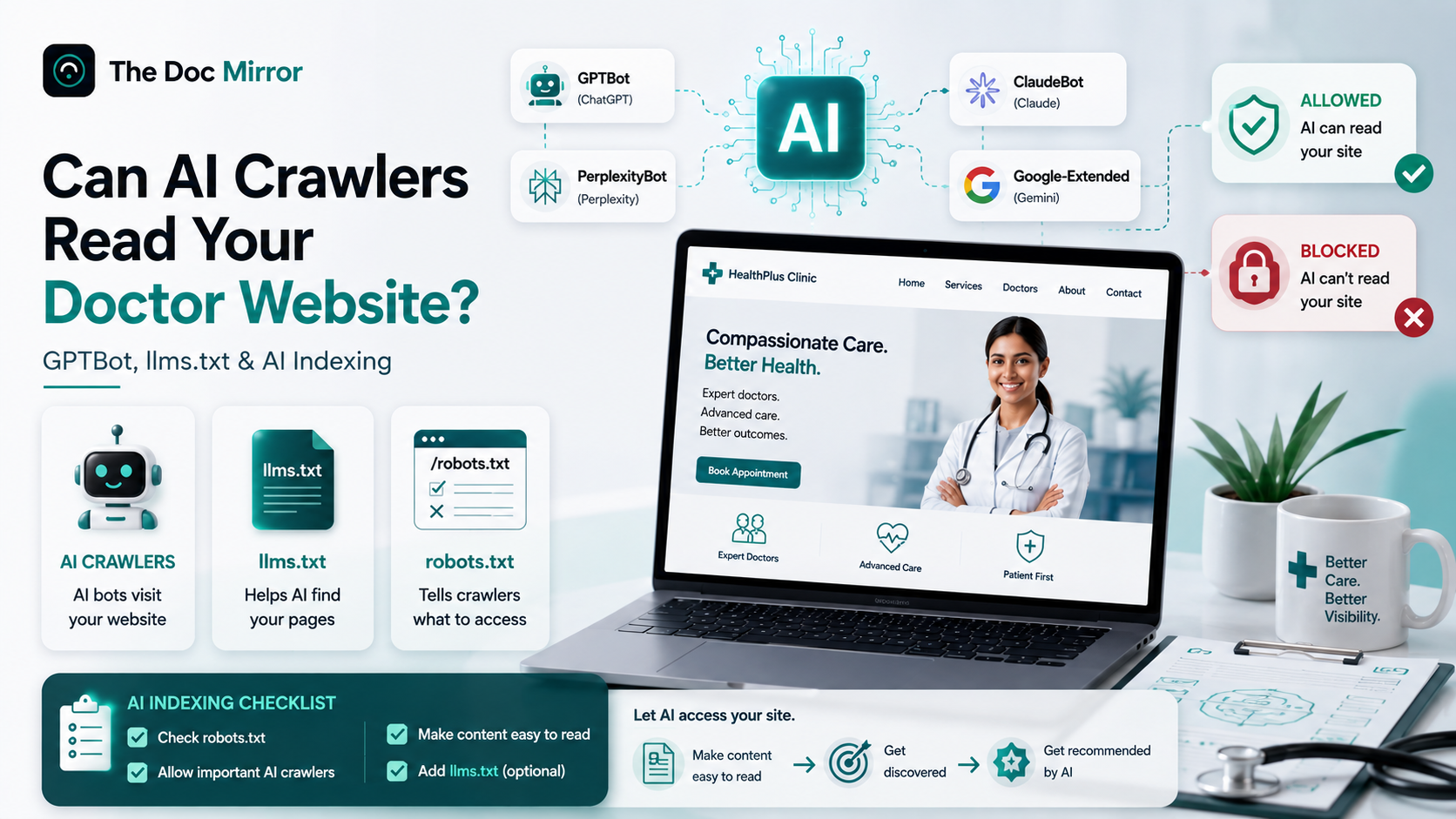
Before ChatGPT, Gemini, Claude, or Perplexity can recommend your clinic, an AI crawler has to reach your pages, read them, and store what it finds. If AI crawlers cannot read your doctor website, you are invisible in AI answers no matter how good your care is. Three things decide access: your robots.txt file, how much of your content needs JavaScript to appear, and increasingly a new convention called llms.txt. This guide explains each one plainly, names the crawlers, and gives you a checklist to confirm AI systems can actually see your site.
What is an AI crawler
An AI crawler is an automated program that visits web pages and collects their text so an AI company can train models or answer live questions. It works like the Googlebot you already know, but it feeds AI assistants instead of the classic search results page.
There are two distinct jobs, and the difference matters for a doctor. Some crawlers gather content to train future models. Others fetch pages in real time when a user asks a question, which is closer to live AI indexing. A single company often runs separate crawlers for each job, and you can allow or block them independently.
Which AI crawlers should a doctor know by name
You do not need to memorize a long list. These are the ones that carry the assistants patients actually use.
- GPTBot - OpenAI's crawler that gathers content for ChatGPT.
- OAI-SearchBot - OpenAI's crawler for showing links inside ChatGPT search results.
- Google-Extended - Google's control for whether your content trains Gemini and appears in some generative features.
- PerplexityBot - the crawler behind Perplexity's cited answers.
- ClaudeBot and anthropic-ai - Anthropic's crawlers connected to Claude.
Each identifies itself with a user-agent string, which is simply a name it sends when it requests a page. Your website can recognize that name and decide whether to serve the page or turn the crawler away. That decision usually lives in one small file.
How robots.txt can accidentally block AI
Robots.txt is a plain text file at the root of your domain, for example yourclinic.com/robots.txt. It tells crawlers which paths they may or may not visit. It has controlled search engines for decades, and now it is the main on-off switch for AI crawlers too.
The problem is that many clinic sites were built on templates that block bots by default, or a developer added a blanket rule years ago. A single line like User-agent: * Disallow: / tells every crawler to stay out, including GPTBot and PerplexityBot. You can also block them by name without realizing the cost. Here is a rule that specifically shuts out ChatGPT's crawler:
User-agent: GPTBot
Disallow: /
That is a legitimate privacy choice for some businesses. For a doctor who wants to be found, it quietly removes you from a growing share of how patients search. To allow AI crawlers instead, you either leave no blocking rule for their user-agent or add an explicit allow:
User-agent: GPTBot
Allow: /
A few honest caveats. Robots.txt is a voluntary instruction, so well-behaved crawlers respect it and others may not. Allowing a crawler does not guarantee you get cited, it only removes the access barrier. And blocking Google-Extended does not remove you from normal Google Search, it only affects Gemini training and certain AI features. If you are unsure what your file says today, that is exactly the kind of gap a free AI visibility audit surfaces in seconds.
What is llms.txt and should you add one
llms.txt is a proposed convention: a Markdown file placed at yourclinic.com/llms.txt that gives AI systems a clean, curated summary of your site and links to your most important pages. Think of it as a plain-language map written for language models rather than for search bots.
Be clear-eyed here. llms.txt is an emerging idea, not an official standard, and there is no confirmation that ChatGPT, Gemini, Claude, or Perplexity currently read it to rank you. It costs little to add and can serve as a tidy, human-readable index of your services, locations, and credentials. Treat it as a low-risk experiment, not a requirement, and never as a substitute for accessible pages and a correct robots.txt. Do not let anyone sell you llms.txt as a guaranteed ranking trick.
A minimal version for a clinic might list your name, specialty, primary location, and links to your services, about, and contact pages. That is it. The value, if any arrives, comes from clarity.
Why heavy JavaScript can hide your content from AI
Here is the failure most doctors never suspect. Your homepage looks perfect in a browser, yet an AI crawler sees a nearly blank page. This happens when your site renders its content with JavaScript after the page loads, a common pattern in modern site builders and single-page apps.
Google has spent years learning to execute JavaScript, so it often still reads these pages. Many AI crawlers are simpler. They fetch the raw HTML and move on, so anything injected later by scripts can be invisible to them. If your services, address, and doctor bios only appear after JavaScript runs, AI indexing can miss the very facts you most want quoted.
The fix is not to abandon modern tools. It is to make sure your core facts exist in the initial HTML. Server-side rendering, static generation, or simply placing key text as real HTML rather than script-loaded content all solve it. A dermatologist in Austin and a gynaecologist in Pune face the identical trap when a flashy template hides the address behind a script.
What most doctors get wrong about AI access
Most doctors assume that because their site ranks on Google, AI can read it too. Those are related but separate systems. You can rank well and still block GPTBot, or pass robots.txt and still hide your content behind JavaScript.
The second common mistake is confusing access with authority. Letting crawlers in is the entry ticket, not the win. Once AI can read you, it still weighs your consistency across directories, your reviews, and your credentials before it recommends you. Access is necessary and not sufficient. If you want the bigger picture of how assistants choose, see how ChatGPT chooses which doctors to recommend.
A third error is set-and-forget. Site rebuilds, new plugins, and template updates can reintroduce a blocking rule overnight. Crawlability is something to check on a schedule, not once.
A checklist to confirm AI can read your site
Run these seven checks. Each maps to a real access failure.
- Open yourclinic.com/robots.txt and confirm there is no
Disallow: /forUser-agent: *that would block everything. - Search the file for GPTBot, Google-Extended, PerplexityBot, ClaudeBot, and anthropic-ai and confirm none are set to Disallow unless you intend it.
- View your homepage source and check that your clinic name, specialty, address, and services appear in the raw HTML, not only after scripts run.
- Confirm your pages return a normal status, so crawlers are not meeting redirects, errors, or login walls on key pages.
- Check that a sitemap.xml exists and lists your important pages, which helps every crawler find them.
- Decide on llms.txt as an optional add, kept short and factual, with no exaggerated claims.
- Re-test after any redesign or plugin change, because access can break silently.
For US doctors, verify the same facts flow to Healthgrades, Zocdoc, Vitals, and WebMD so AI sees a consistent story off-site too. For doctors in India, keep your details on Practo, JustDial, Lybrate, and Apollo 247 accurate and identical, framed strictly as making existing, factual information consistent and findable rather than as promotion. Under NMC rules this is about accuracy, not advertising.
Getting crawlability right is one layer. Structured data and a clear entity identity are the next two, and they build on this foundation. If you want the full picture of technical AI readiness, read the pillar overview on AI visibility for doctors.