Storefront vs Service Area: Which Business Type Should Your Practice Use?
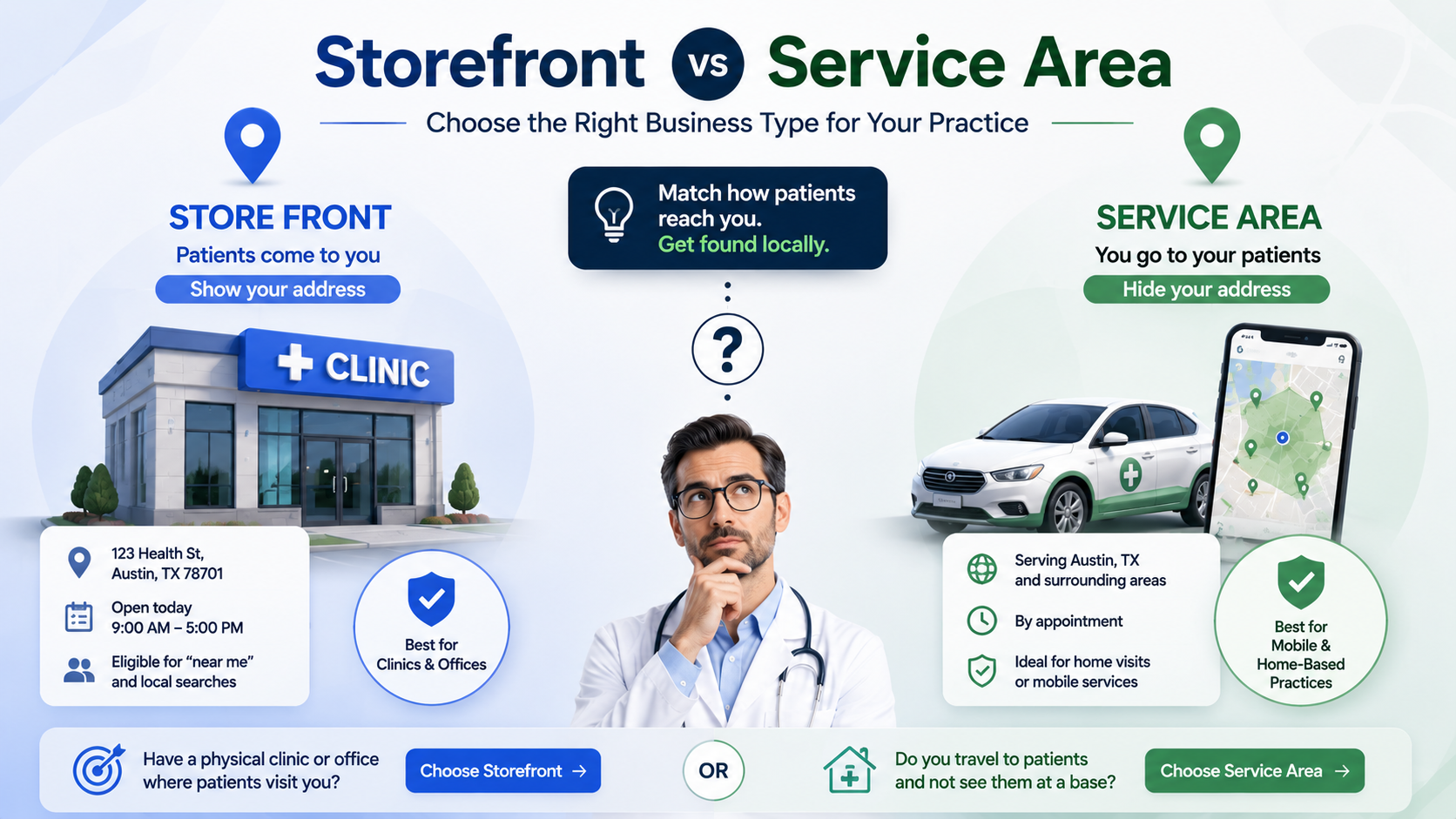
Choose storefront if patients come to you at a fixed address, and choose service area if you travel to patients and do not see them at a base location. Getting this one setting right matters more than it looks: a clinic patients visit that hides its address can drop off Maps for local searches, while a home-based practice that displays a residential address can be suspended. Google decides how and whether to show your listing partly on this business type, so setting it to match how patients actually reach you is a foundational fix, not a cosmetic one. This guide explains the difference, how to choose, and the hybrid case where you do both.
Most practices are simple storefronts and should just show their address. The setting only gets tricky for home-based providers, mobile services, and telehealth-heavy practices, which is where the mistakes, and the suspensions, cluster.
What the two business types mean
Google Business Profile supports two location models, and your listing behaves differently under each.
- Storefront (a location patients visit): your full street address is shown publicly, and your listing can appear in Maps and local searches for that address. This is the default for a clinic, office, or practice with a waiting room.
- Service-area business (you go to the patient): the street address is hidden, and instead you list a service area, the cities or regions you cover. This fits a provider who travels to patients and does not receive them at a base address.
The single deciding question is: do patients physically come to your listed address to be seen? If yes, you are a storefront. If no, you are a service-area business.
When to use storefront
Use storefront if you have an office, clinic, or suite where patients arrive for appointments. Show the full, accurate street address, including the suite number, exactly as it appears on your other listings. A storefront listing is eligible to rank for "near me" and city-based searches tied to that address, which is what most practices want.
A common and damaging error is a visited clinic hiding its address, sometimes done for privacy or by copying advice meant for mobile businesses. Hiding the address of a place patients actually visit can remove you from the local searches you most need to appear in. If patients come to you, show the address.
When to use service area
Use service area if you are genuinely mobile: a home-visit physician, a mobile phlebotomy or imaging service, a house-call therapist. You hide the street address and define the regions you serve. Google advises keeping the stated service area reasonable, roughly within a two-hour drive of your base, rather than claiming an entire state you do not truly cover.
The critical case here is the home-based practice. If you run your practice from home and patients do not come to your house, you should set a service area and hide the residential address. Displaying a home address you operate from but do not see patients at is a frequent suspension trigger, because it breaches Google's address rules. Set the service area instead.
The hybrid case: you have an office and you also travel
Some practices both see patients at an address and travel to others, for example a clinic that also does home visits. Google allows a hybrid setup: you keep the storefront address shown because patients do visit it, and you also add a service area for the regions you travel to. The test still holds, you show the address because patients come to the office, and you add the service area on top for the mobile part. Do not hide a real, visited address just because you also travel.
Telehealth does not change your address setting
A practice that does a lot of virtual visits sometimes wonders whether to hide its address. The rule does not change: if patients ever come to a physical office, that office is a storefront and its address should show. Telehealth is a service you offer, not a business-type category. Do not convert a real office into a hidden service-area listing because some visits are virtual, or you can lose local visibility for the in-person care you still provide.
What most doctors get wrong about business type
The two mistakes mirror each other. A visited clinic hides its address, usually chasing privacy or following generic advice, and then quietly disappears from "near me" searches. A home-based provider shows a residential address, and then gets suspended for an address that breaks Google's rules. Both come from setting the type against how patients actually reach you. Ask the one question, do patients come to this address, and set the type to the honest answer. If your listing was recently suspended over an address, the fix path is in how to reinstate a suspended Google Business Profile.
A note on AI: consistent location data feeds AI answers
Your business type shapes the location data that flows out to directories and, from there, to AI answers. When a patient asks ChatGPT, Gemini, Claude, or Perplexity for a nearby doctor, those tools name one to three practices using consistent address and service data across sources. A storefront that hides its address, or a home practice with a conflicting residential address floating across directories, gives AI models a muddled location signal, which makes you harder to name for a local query. A correct, consistent business type keeps that signal clean.
Set your business type correctly this week
Ten minutes settles it.
- Answer the deciding question: do patients physically come to your listed address to be seen?
- If yes, set storefront and show the full, accurate street address with the suite number.
- If no, and you travel to patients or work from home without visits, set a service area and hide the address, keeping the area within roughly a two-hour drive.
- If both are true, keep the storefront address shown and add a service area on top.
Business type is part of your Google Business Profile pillar, the heaviest single factor in local visibility. The Free Audit at thedocmirror.com checks that your profile and address details are consistent and set up correctly, and compares you to your top local competitors, in about 90 seconds with no signup for the free score.